Grow your YouTube channelwith a coach that reads your numbers
Tube Studio is the YouTube growth toolkit inside AI Influencer Studio. Find the keywords where viewers are waiting and smaller channels still rank, check a title and thumbnail before you upload, and get a coach that studies your channel's real stats, then tells you what to fix and the next 10 videos to make.
No card needed · plans from $9.99/month · cancel anytime
~30 s
From a keyword to its full report
5 credits
Per keyword report; a title and thumbnail check is 3
Included
The Coach and its chat are part of the Professional plan
What you get
Keyword Explorer
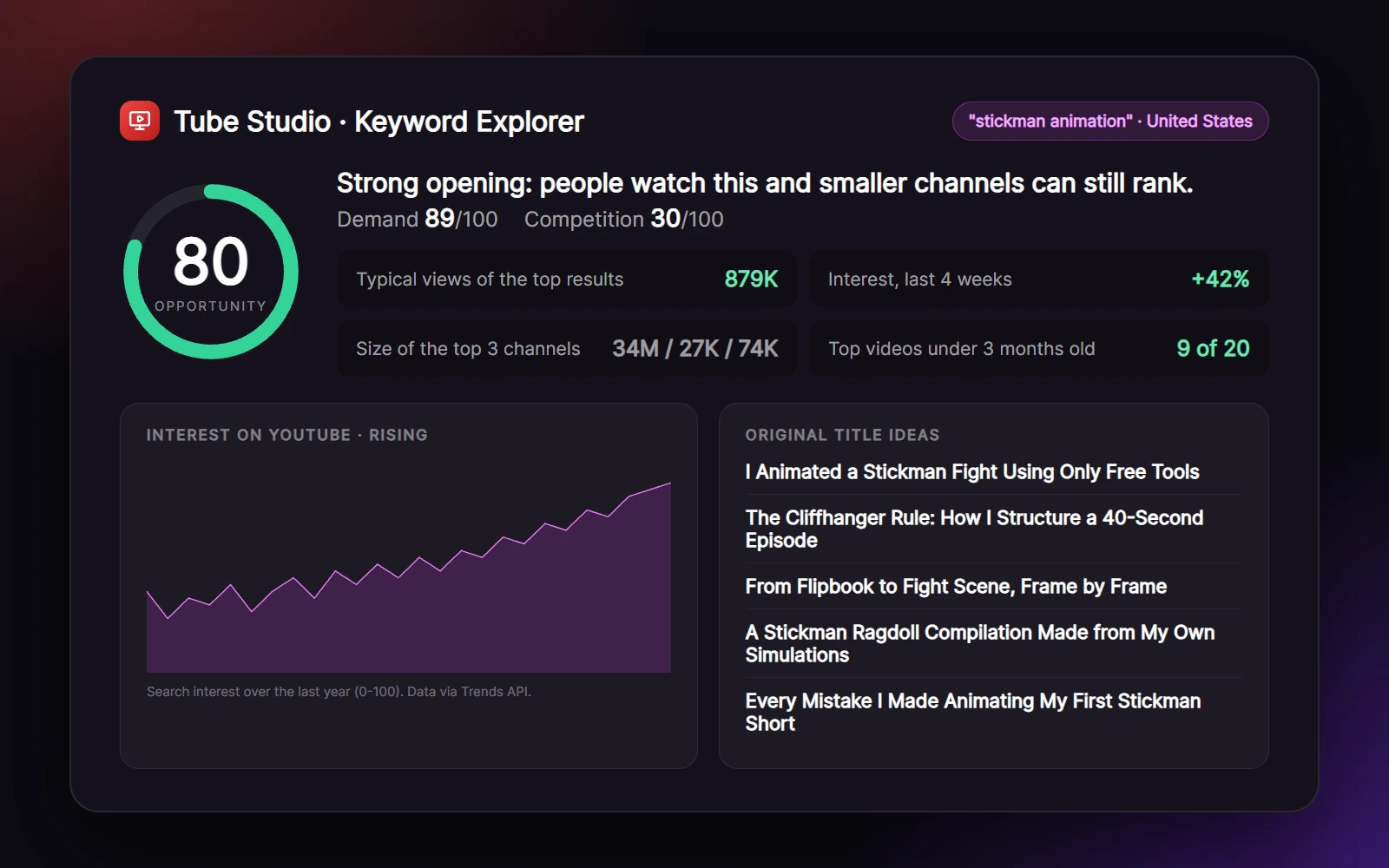
Type a topic and see the current top 20 YouTube results, the size of the channels that rank, how fresh the top videos are and whether interest is rising, summed up in one opportunity score.
What viewers want
The AI reads the comments on recent videos about your keyword and tells you what viewers ask for, complain about and reward, so your video answers it.
Original title ideas
Ten titles in the patterns that win your keyword, plus angles a new video can take and related keywords to explore next. Never a copy of someone else's title.
Video Checker
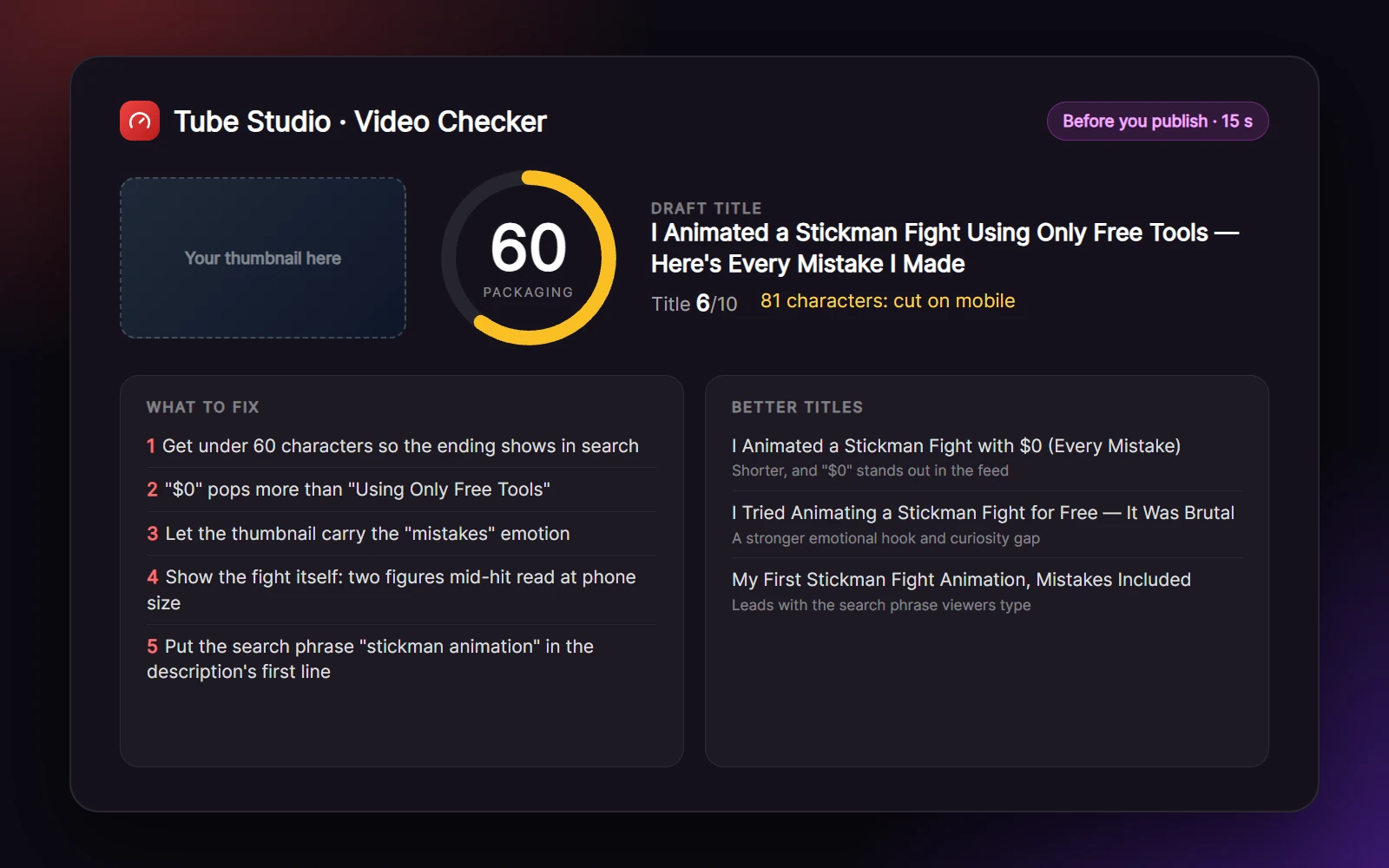
Paste any video, or test your title and thumbnail before you upload. You get a packaging score, what works, what to fix, three better titles, thumbnail ideas and a description outline.
The Coach (Pro)
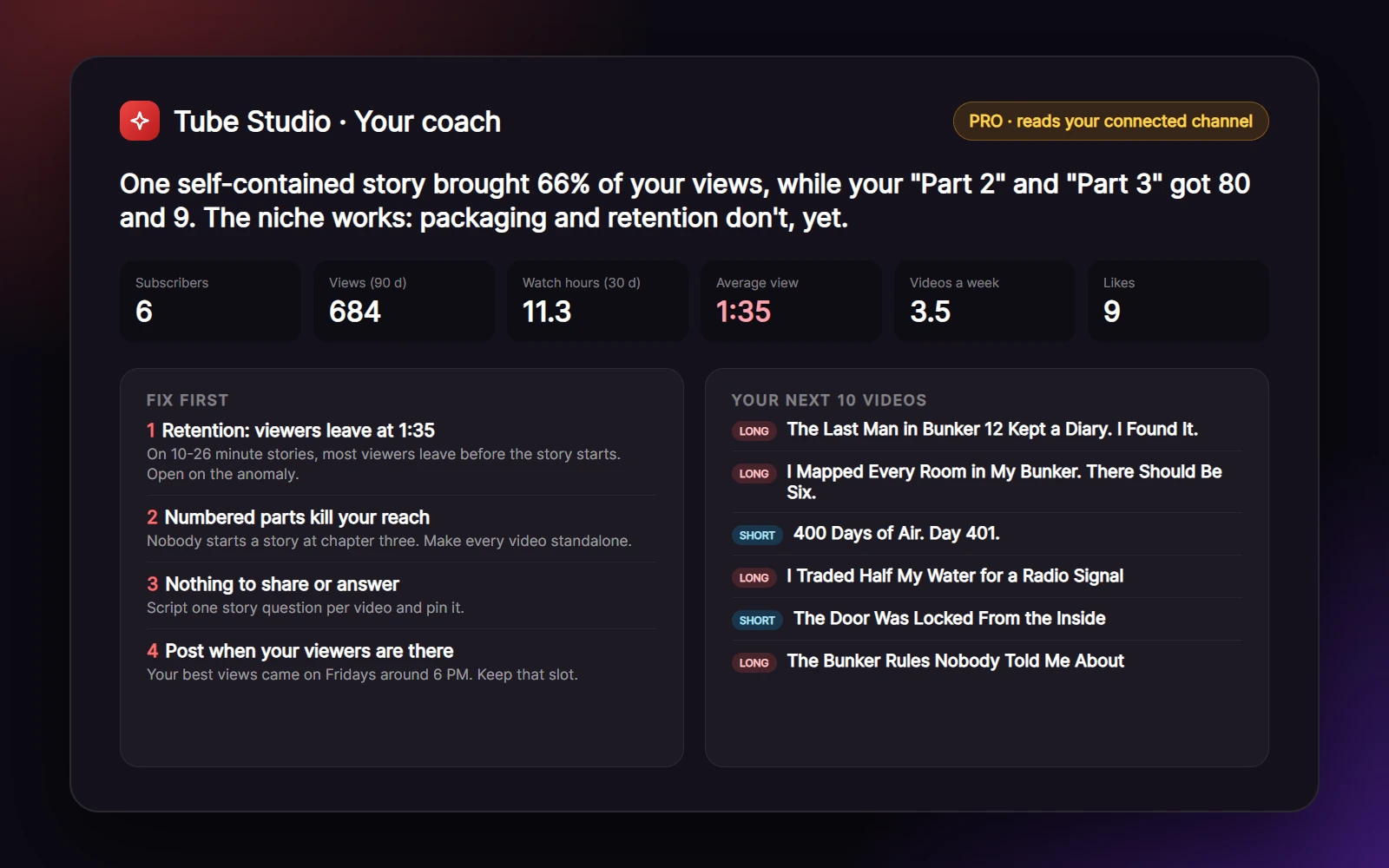
Connect your channel and the coach reads its real stats: views, watch time, average view, posting rhythm and your best videos. It finds your niche, checks the competition and plans your next 10 videos.
Ask anything, share a thumbnail
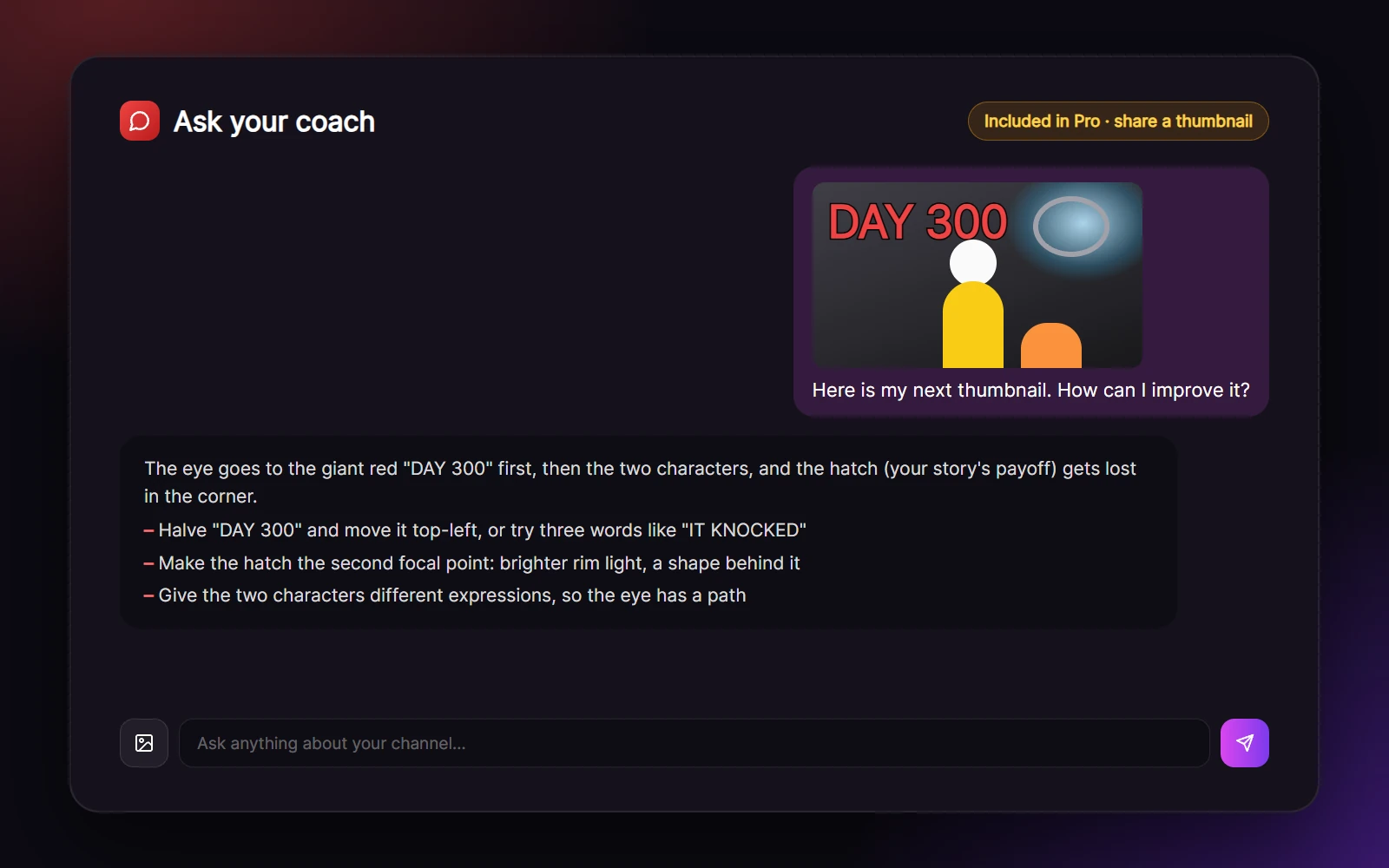
Chat with your coach about your channel, upload a thumbnail or a screenshot for a review, and ask how to start earning. The chat is free on the Professional plan.
How it works
- 01
Find a keyword
Type a topic and pick a country. About 30 seconds later you see the opportunity score, the competition, the interest trend and what viewers want.
- 02
Check before you publish
Test your title and thumbnail against what ranks for your topic, then use the better titles and the thumbnail ideas.
- 03
Get your coach's plan
On Pro, connect your YouTube channel once. The coach reads your stats and gives you what works, what to fix, your next 10 videos and when to post.
- 04
Make the video
Every idea has a Make it button that opens Storyboard Studio with the title and hook filled in, and thumbnail ideas open in Image Studio.
Find keywords where smaller channels still win
Most keyword tools stop at a search volume. Tube Studio looks at who actually ranks: how many views the top videos get, how big the channels behind them are, how many of the top results are less than three months old and how many different channels share the page. Big demand with fresh videos from small channels is an open door; big demand owned by giant channels with two-year-old videos is not.
Each part of the score is shown, so you see why a keyword is open or crowded. Interest over time comes from YouTube search trends (data via Trends API), and the AI adds what viewers say in the comments of recent videos about it.
Check your title and thumbnail before you upload
The title and the thumbnail decide whether anyone clicks. In the Video Checker, type the title you plan to use, add your thumbnail and your topic: the AI compares them with what ranks for that topic right now and tells you honestly what holds the click back, from a title cut off on mobile to text that fights the main subject.
It works on published videos too. Paste any video link to see its views per day, like and comment rates and views per subscriber, with a full packaging review, three better titles, thumbnail ideas, a description outline and search phrases.
A coach that reads your channel, not a generic checklist
On the Professional plan, connect your YouTube channel once and the coach reads its real numbers: views, likes and comments per video, watch time, average view duration, posting rhythm and your best posting slots. It works out your niche from your own titles and checks that niche's competition before it says a word.
On a small survival-story channel we tested, the coach found that one standalone video brought two thirds of all views while the numbered 'Part 2' and 'Part 3' collapsed, and that viewers left after about a minute and a half on 10 to 26-minute stories. Its plan: make every video standalone, open on the mystery, and ten new ideas built on the format that already worked.
Ask your coach anything, and show it your thumbnails
Below every coach report is a chat that knows your numbers and your plan. Ask which video to remake, ask for the script outline of an idea, or ask when and how your channel can start earning: the coach answers with your real numbers and points you to YouTube's current requirements.
Upload a thumbnail or a screenshot and the coach reviews it like a designer: what the eye sees first, the text, the faces, the colors and how it reads at phone size, with the two or three changes that would get more clicks. The Coach and its chat are included in the Professional plan.
Made for faceless and AI channels
Tube Studio is built for creators who make videos with AI: story and animation channels, history and mystery, survival, explainers and faceless channels. Its advice fits that work, and it goes straight to production: ideas open in Storyboard Studio, thumbnails in Image Studio, narration in Voice Studio.
It is also honest about what YouTube rewards. Mass-produced, repetitive AI videos can be refused monetization, so every report pushes original ideas, a real point of view and real craft, and reminds you to label realistic AI content when you upload.
Questions, answered
What is Tube Studio?
Tube Studio is a YouTube growth toolkit in AI Influencer Studio with three parts: Keyword Explorer (keyword research with an opportunity score), Video Checker (a title and thumbnail review before or after you publish) and the Coach (an AI coach that reads your connected channel's stats, on the Professional plan).
Which plans include it?
Keyword Explorer and Video Checker are on the Creator and Professional plans: 5 credits per keyword report and 3 credits per video check, charged only when the report succeeds. The Coach is part of the Professional plan with no credits: up to 3 coach reports a day and a free chat.
How is the opportunity score calculated?
It is our own estimate, shown with all its parts: demand comes from the views of the current top YouTube results and whether interest is rising; competition from the size of the top channels, the age of the top videos and how many different channels share the results. High demand with low competition scores best.
Does the coach see my real YouTube numbers?
Yes. On the Professional plan you connect your YouTube channel in the Content Calendar, and the coach reads its stats: views, likes and comments per video, watch time, average view duration, subscribers gained and your best posting slots. YouTube shares watch time with a delay of 2 to 3 days.
Can I check a thumbnail before I upload?
Yes, two ways. In Video Checker, add your planned title and thumbnail for a packaging score and fixes. On Pro, you can also upload a thumbnail in the coach chat for a detailed review in the context of your channel.
Will it tell me how to monetize my channel?
When it is relevant, or when you ask. The coach explains where your channel stands and what to work on first, and points you to YouTube's current Partner Program requirements. It never promises views or income.
Where does the data come from?
Keyword reports use the current top YouTube search results and comments on recent videos; interest over time is data via Trends API. The Coach reads your own channel through the social account you connect in the Content Calendar.
Grow your YouTube channel with Tube Studio
Every new account gets 100 free credits. No card needed.
Get 100 free credits